
Screen time they earn.
Your child does a real chore. You approve it. The minutes land on their phone and count down while they play. At zero, the games lock until the next mission.
1 thing is waiting for you
Alex
Level 3 · 14 stars
0 min left
Chores to check
Clean bedroom
Alex · finished just now
Approved
20 minutes sent to Alex’s phone
- Approve
- Play
- Time’s up
A sample family. Tap through the deal yourself.
You’re on the list!
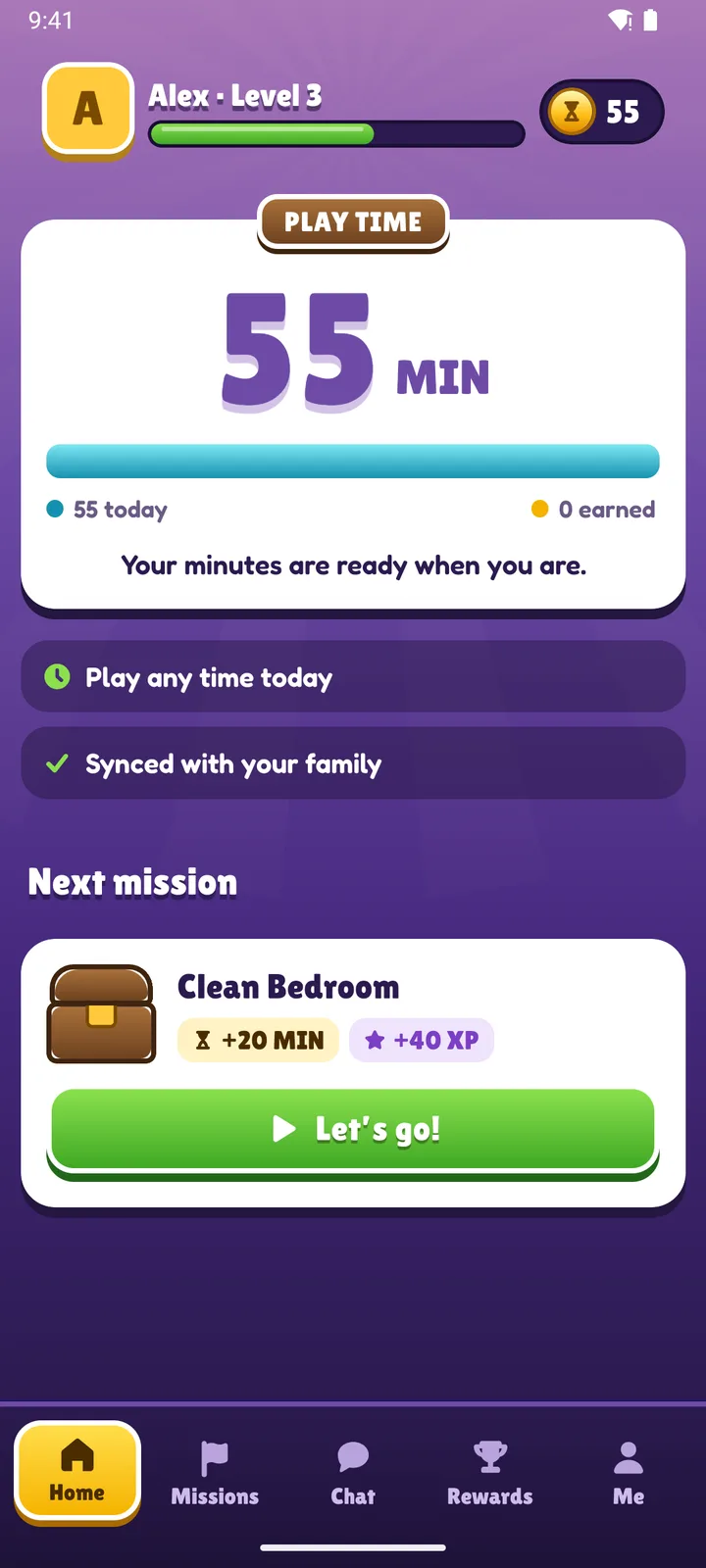
Alex · Level 3
0MIN
Finish a mission to earn play time.
Clean bedroom
Waiting for a parent to check
Time’s up for now
Complete another mission or ask your parent for more time.
Save your family a spot.
We’ll email you when Timer Quest is ready for your family.
- Android works today
- iPhone app in progress
- Free to start
You’re on the list!
The real apps, doing the real thing.
Real screen recordings of the Timer Quest apps, with a sample family in them.
-
You pick a chore
Start from 32 ready-made ideas or write your own, and choose the minutes, XP and stars it earns.
-
They do the mission
Each mission shows what it earns. They start it, finish it, and add a photo if you ask for one.
-
You approve
Everything waiting for you is on Home: chores to check, requests for time and rewards to give.
-
They save up
Missions also earn stars for rewards you set up. Stars are spent only when you say yes.
Two apps
Yours is calm.
The Parent app is a short list of what needs you, then each child at a glance. Use it on Android or in any web browser.
- Approve chores and requests in one tap
- Daily allowances, play hours and bedtime
- Per-app rules: uses minutes, always allowed, or blocked
- Activity for the last day, week or month
- An alert when a phone stops being protected
Theirs is a game.
The Child app looks like the game lobbies they already know, and it never scolds. Paused time always points to the next mission.
- Missions, XP and levels
- Stars to spend in a reward shop you set up
- Ask for more time, an app, or to play now
- A live countdown when you open play time
- A private chat with you
The rules you’d set anyway, minus the arguing.
Set them once in the Parent app. Their phone keeps to them, even offline.
Alex’s rules
-
Play hours
Outside them, play waits and their minutes keep for tomorrow.
Weekdays 4–7 pmWeekends 9–7
-
Bonus time and play now
Give extra minutes, or open play hours for a while. Their phone shows the countdown.
+15 minPlay now
-
Asking, not nagging
They ask for more time, an app or to play now. You answer in one tap.
-
Every app on screen
Split screen and floating players count too. A locked video player is paused.
Family
-
Rewards you choose
Missions earn stars for rewards you set. Stars are spent only when you say yes.
Later bedtime · 12 stars
-
Works offline
Time used offline is counted when the phone reconnects.
-
Family chat
A private chat with big quick replies. No contacts, no strangers.
-
Protection alerts
If a phone stops checking in or a setting is turned off, you hear about it.
What Timer Quest never sees.
To apply your family’s rules, the Child app only needs to know which app is open. Family chat stays between you and your child and is deleted after 30 days.
- Their messages
- What they type
- The websites they visit
- What’s on their screen
Questions parents ask.
When can my family use it?
The Android apps work today and are being tested with real families. The iPhone app is in progress. Join the waitlist and we’ll email you when there’s a spot for your family.
What does it cost?
It’s free to start. A paid Family Plus plan with extra features is planned, and prices aren’t set yet.
What ages is it for?
Children aged 6 to 14. The Child app is simple enough for early readers and doesn’t feel babyish to a 13-year-old.
What devices do we need?
An Android phone or tablet for your child. You can use the Parent app on Android or in any web browser.
Can my child just uninstall it?
Android doesn’t let the app block uninstalling yet. If your child’s phone stops checking in or a needed setting is turned off, you get an alert, so you’ll know.
Does it read my child’s messages?
No. It never reads messages, typing, browsing or what’s on the screen. It only sees which app is open, so it can apply your rules.

Join the waitlist.
It takes ten seconds, and the family details are optional.
You’re on the list!